Electronic Data Access (EDA) - UII GFP Custody Detail Report
 

UII GFP Custody Detail Report

Training Document


IUID GFP Custody By CAGE/DUNS/DoDAAC Report provides GFP custody information by CAGE that includes, but not limited to Part and Serial Numbers, NSN and Sent/Received Dates. The IUID GFP Custody By Contract Detail Report provides GFP custody information by contract that includes, but not limited to Part and Serial Numbers, NSN and Effective Dates.


EDA Roles

Roles with access to the UII GFP Custody Detail Report:

  • Acquisition Sensitive Reporting
    • GSC users with this user role will have the ability to view UII GFP Custody Detail Report data based on Issue By and Contract Number/Delivery Order.
  • Advanced Reporting
    • GSC users with this user role will have the ability to view UII GFP Custody Detail Report data based on Issue By and Contract Number/Delivery Order.
  • Executive Reporting
    • GSC users with this user role will have the ability to view all UII GFP Custody Detail data.
  • Vendor
    • Access will be granted by CAGE whose contracts are on the report.
    • Access will not be granted to the report, if they only have access to the CAGE + Extension.
  • Vendor View Only
    • Access will be granted by CAGE whose contracts are on the report.
    • Access will not be granted to the report, if they only have access to the CAGE + Extension.
Where to Run the Report

Expand the Reports menu under Analytics in EDA and select the IUID Reports option.

The image provides a preview of the IUID Reports Menu.

In the IUID Reports section select the UII GFP Custody Detail Report.

The image provides a preview of the UII GFP Custody Detail Report Link.

Search Criteria

The UII GFP Custody Detail Report page displays. Enter search criteria to retrieve desired data.

UII GFP Custody Detail Report Search Criteria:

  • Report Type *
    • UII GFP Custody By CAGE/DUNS/DoDAAC (radio button)
    • UII GFP Custody By Contract (radio button)
  • Current or Historical Data
    • Current (radio button)
    • Historical (radio button)
  • Effective Date From
  • Effective Date To

(field displays when ‘UII GFP Custody By CAGE/DUNS/DoDAAC’ is selected)

  • CAGE Code *

(fields displays when ‘UII GFP Custody By Contract’ is selected)

  • Custodial Contract Number *
  • Custodial Contract Order Number

The image provides a preview of the UII GFP Custody Detail Report Search Criteria.

Buttons:

  • Search
  • Bookmark
  • Cancel

Click the Search button after entering the search criteria. The search results display on the following page.

Search Results

The UII GFP Custody Detail Report Results table displays the search results.

UII GFP Custody Detail Report Results Columns:

By CAGE/DUNS/DoDAAC:

  • Custodial Contract Number
  • Custodial Contract Order Number
  • Effective Date
  • DUNS
  • Unique Entity Identifier
  • CAGE Code
  • DoDAAC
  • UID Type
  • UID Code
  • Unit of Measure Part Number
  • Serial Number
  • National Stock Number
  • Sent Date
  • Received Date
  • Life Cycle Event
  • Life Cycle Event Date
  • Custody

By Contract:

  • Custodial Contract Number
  • Custodial Contract Order Number
  • Effective Date
  • DUNS
  • Unique Entity Identifier
  • Part Number
  • UID Type
  • UID Code
  • National Stock Number
  • Acquisition Cost
  • Issuing Agency Code
  • Enterprise Identifier
  • Serial Number
  • Unit of Measure Serial Number
  • Special Tooling
  • Life Cycle Event
  • Life Cycle Event Date
  • Custody

The image provides a preview of the UII GFP Custody Detail Report Results Overview.

Buttons:

  • Export
    • As CSV
    • As Excel
  • Save Search
  • Refine Search
  • New Search

NOTE: The columns are sortable.

Exporting Search Results

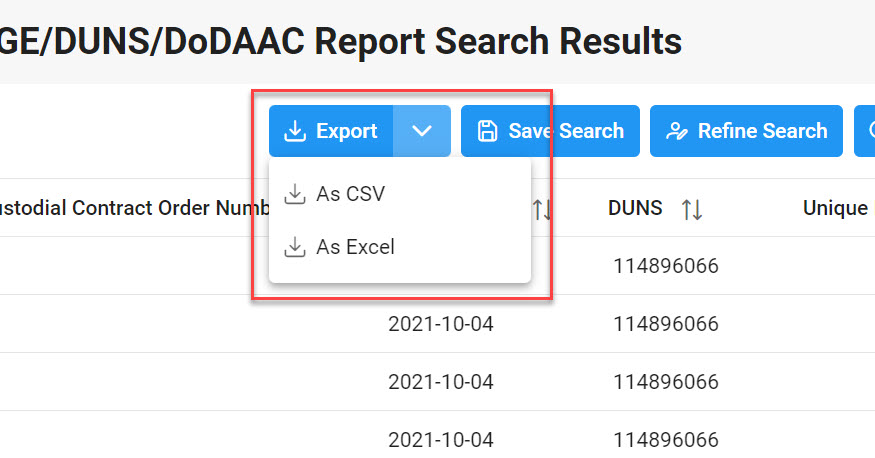
Click the Export button on the search results page to export as CSV or Excel. A job runs to download the file.

The image provides a preview of the UII GFP Custody Detail Report Export button location.

Viewing Available Downloads of Reports:

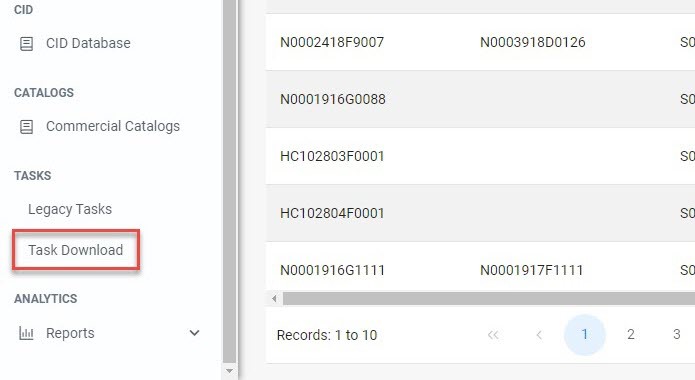
In the navigation panel, under the Tasks menu, select Task Download.

The image provides a preview of the Task navigation option.

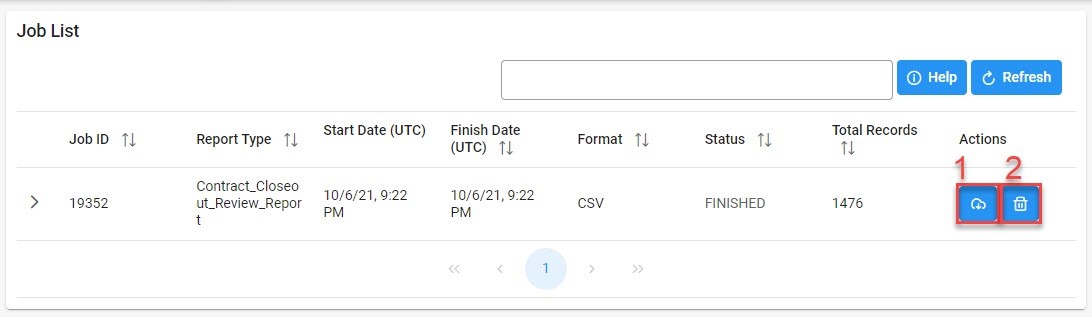
The Job List page appears. Click the Download button in the Actions column.

The image provides a preview of the UII GFP Custody Detail Report Export button location.

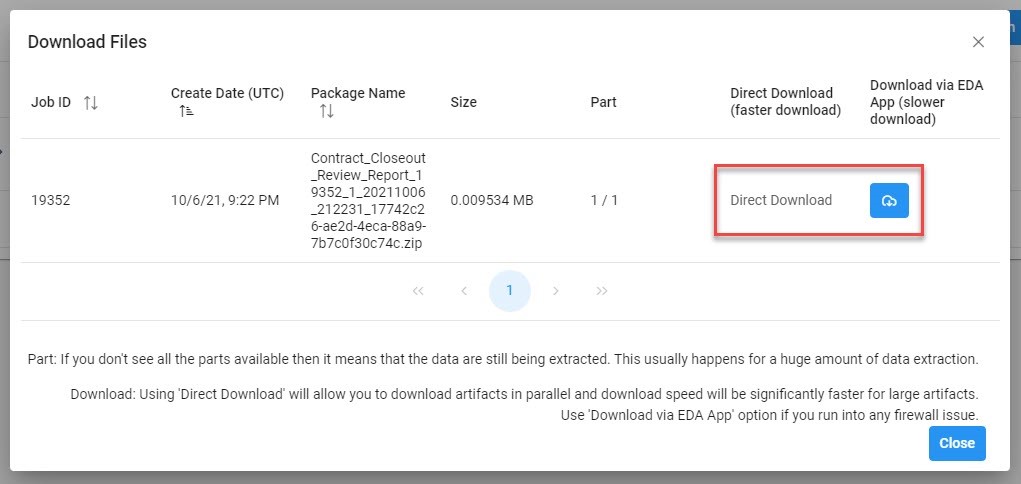
The Download Files pop-up appears with job details. Select the Direct Download link in the Direct Download (faster download) column.

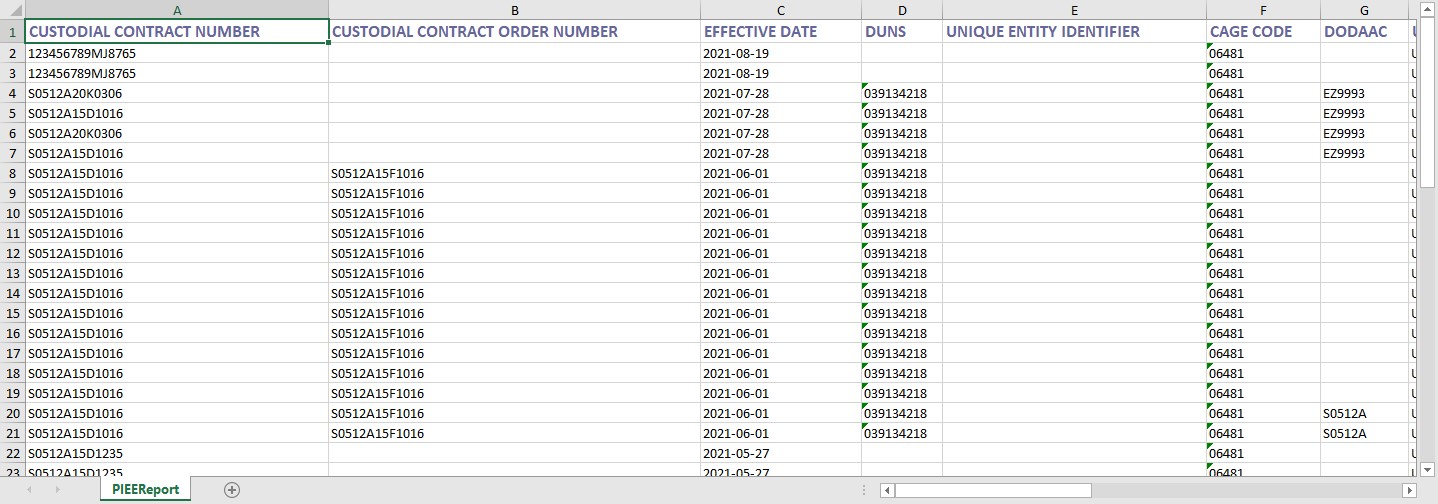
The image provides a preview of the UII GFP Custody Detail Report Export excel sample Results sample.

The system downloads the file to the local machine based on browser settings.

Exported Report Columns:

By CAGE/DUNS/DoDAAC:

  • Custodial Contract Number
  • Custodial Contract Order Number
  • Effective Date
  • DUNS
  • Unique Entity Identifier
  • CAGE Code
  • DoDAAC
  • UID Type
  • UID Code
  • Unit of Measure Part Number
  • Serial Number
  • National Stock Number
  • Sent Date
  • Received Date
  • Life Cycle Event
  • Life Cycle Event Date
  • Custody

By Contract:

  • Custodial Contract Number
  • Custodial Contract Order Number
  • Effective Date
  • DUNS
  • Unique Entity Identifier
  • Part Number
  • UID Type
  • UID Code
  • National Stock Number
  • Acquisition Cost
  • Issuing Agency Code
  • Enterprise Identifier
  • Serial Number
  • Unit of Measure Serial Number
  • Special Tooling
  • Life Cycle Event
  • Life Cycle Event Date
  • Custody

Sample Export:

The image provides a preview of the UII GFP Custody Detail Report Export excel sample Results sample.