Electronic Data Access (EDA) - DCAA Vouchers by Invoice Received Date Report
 

DCAA Vouchers by Invoice Received Date Report

Training Document


The DCAA Vouchers by Invoice Received DateReport provides information on Cost Vouchers, to include contract header information and routing information.


EDA Roles

Roles with access to the DCAA Vouchers by Invoice Received Date Report:

  • Advanced Reporting (access to the report requires that the user’s profile to have a Home Org that starts with “HAA”)
Where to Run the Report

Expand the Reports menu under Analytics in EDA and select the System Property Audit Reports option.

The image provides a preview of the DCAA Vouchers by Invoice Received Date Report Export button location.

In the System Property Audit Reports section select the DCAA Vouchers by Invoice Received Date Report.

The image provides a preview of the DCAA Vouchers by Invoice Received Date Report Export button location.

Search Criteria

The DCAA Vouchers by Invoice Received Date Report page displays. Enter search criteria to retrieve desired data.

DCAA Vouchers by Invoice Received Date Report Search Criteria:

  • Invoice Received Date From *
  • Invoice Received Date To *
  • Voucher Type * (multi-select drop-down, options: Direct / Non-Direct)
  • Final Invoice Indicator * (multi-select drop-down, options: Final / Non-Final)
  • Document Status * (multi-select drop-down)
  • Contract Number (parameters: Starts With / Equal to)
  • Delivery Order Number (parameters: Starts With / Equal to)
  • CAGE Code(s) (parameters: Starts With / Equal to)
  • Auditor DoDAAC(s) (parameters: Starts With / Equal to)
  • Payment DoDAAC(s) (parameters: Starts With / Equal to)

The image provides a preview of the DCAA Vouchers by Invoice Received Date Report Export button location.

Buttons:

  • Search
  • Bookmark
  • Cancel

Click the Search button after entering the search criteria. The search results display on the following page.

Search Results

The DCAA Vouchers by Invoice Received Date Report Results table displays the search results.

DCAA Vouchers by Invoice Received Date Report Results Columns:

  • Contract Number
  • Delivery Order Number
  • Shipment Number
  • Invoice Number
  • Active or Archived
  • Status
  • Admin DoDAAC
  • Auditor DoDAAC
  • Auditor Extension
  • CAGE Code
  • CAGE Code Extension
  • DUNS
  • DUNS +4
  • Unique Identity Identifier
  • Contractor Name
  • Issue By DoDAAC
  • Issue By Extension
  • Ship to DoDAAC
  • Ship To Extension
  • LPO DoDAAC
  • LPO Extension
  • Pay DoDAAC
  • Invoice Date
  • Invoice Received Date
  • LPO Certification Date
  • Acceptance Date
  • LPO Reject Date
  • Shipment Date
  • Voucher Type
  • Final Invoice Indicator
  • Voucher Document Type
  • Contract Number Type
  • Submit Date
  • Currency
  • Invoice Amount
  • Last Update Date

The image provides a preview of the DCAA Vouchers by Invoice Received Date Report Export button location.

Buttons:

  • Export
    • As CSV
    • As Excel
  • Save Search
  • Refine Search
  • New Search

NOTE: The columns are sortable.

Exporting Search Results

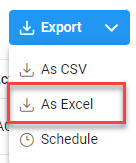
Click the Export button on the search results page to export as CSV or Excel. A job runs to download the file.

The image provides a preview of the DCAA Vouchers by Invoice Received Date Report Export excel sample Results sample.

Viewing Available Downloads of Reports:

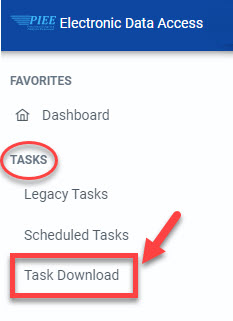
In the navigation panel, under the Tasks menu, select Task Download.

The image provides a preview of the DCAA Vouchers by Invoice Received Date Report Export excel sample Results sample.

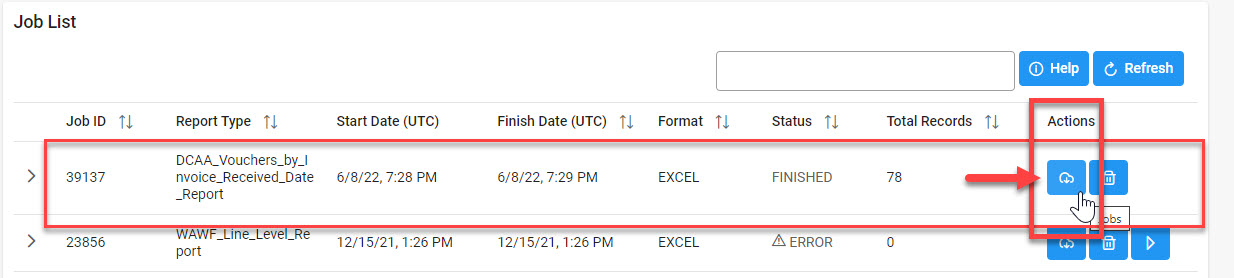
The Job List page appears. Click the Download button in the Actions column.

The image provides a preview of the DCAA Vouchers by Invoice Received Date Report Export excel sample Results sample.

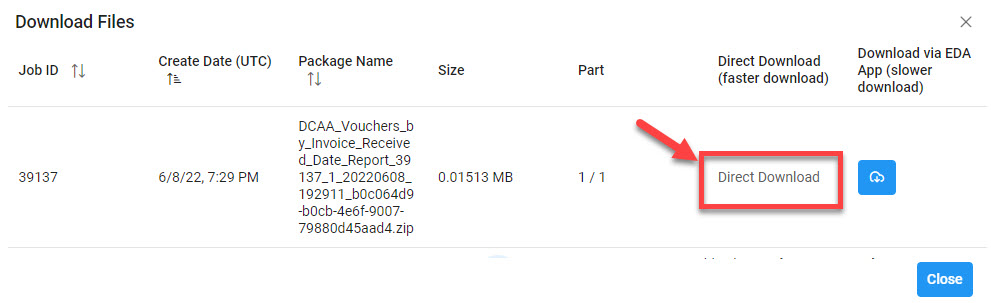
The Download Files pop-up appears with job details. Select the Direct Download link in the Direct Download (faster download) column.

The image provides a preview of the DCAA Vouchers by Invoice Received Date Report Export excel sample Results sample.

The system downloads the file to the local machine based on browser settings.

Exported Report Columns:

  • Contract Number
  • Delivery Order Number
  • Shipment Number
  • Invoice Number
  • Active or Archived
  • Status
  • Admin DoDAAC
  • Auditor DoDAAC
  • Auditor Extension
  • CAGE Code
  • CAGE Code Extension
  • DUNS
  • DUNS +4
  • Unique Identity Identifier
  • Contractor Name
  • Issue By DoDAAC
  • Issue By Extension
  • Ship to DoDAAC
  • Ship To Extension
  • LPO DoDAAC
  • LPO Extension
  • Pay DoDAAC
  • Invoice Date
  • Invoice Received Date
  • LPO Certification Date
  • Acceptance Date
  • LPO Reject Date
  • Shipment Date
  • Voucher Type
  • Final Invoice Indicator
  • Voucher Document Type
  • Contract Number Type
  • Submit Date
  • Currency
  • Invoice Amount
  • Last Update Date

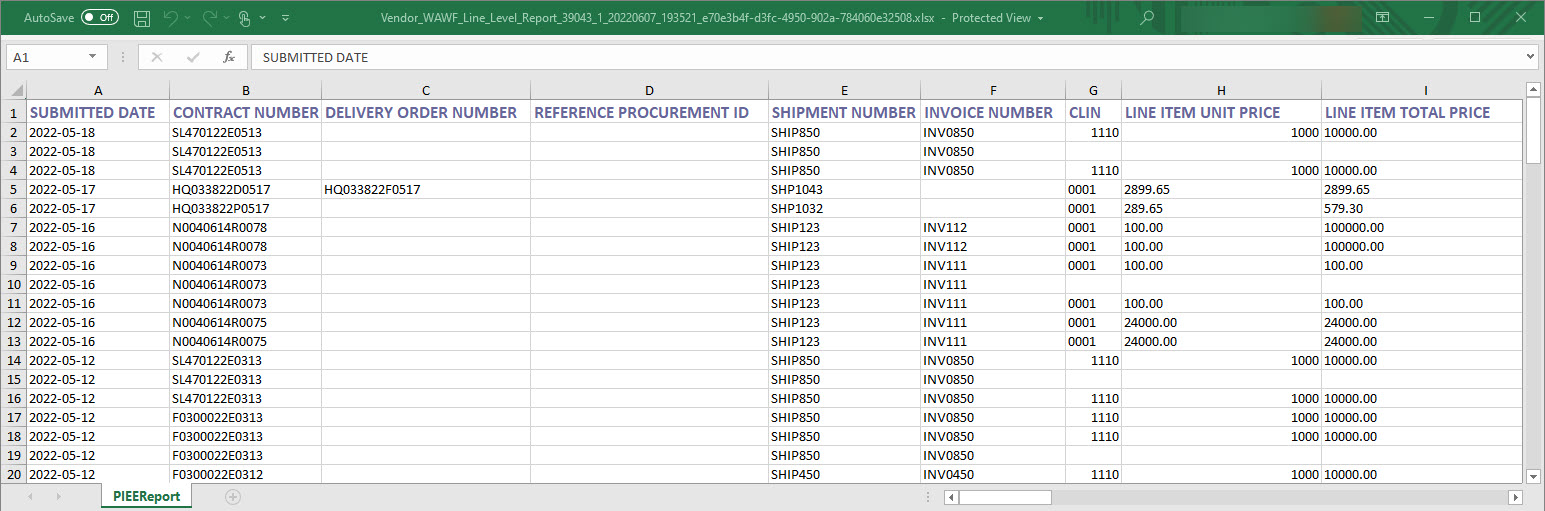
Sample Export:

The image provides a preview of the DCAA Vouchers by Invoice Received Date Report Export excel sample Results sample.