Electronic Data Access (EDA) - CDR Detail Report
 

CDR Detail Report

Training Document


CDR Detail Report provides CDR detail and status information for a given Contract Number / Delivery Order by Initiation Date.


EDA Roles

Roles with access to the CDR Detail Report:

  • Advanced Reporting (able to view filtered results based on the user’s registered Issue By and Contract Number/Delivery Order Number)
  • Acquisition Sensitive Reporting (able to view filtered results based on the user’s registered Issue By and Contract Number/Delivery Order Number)
  • EDA Executive Reporting (able to view all data)
Where to Run the Report

Expand the Reports menu under Analytics in EDA and select the CDR Reports option.

The image provides a preview of the CDR Reports navigation under Reports in EDA.

In the CDR Reports section select the CDR Detail Report.

The image provides a preview of the CDR Detail Report navigation under CDR Reports in EDA.

Search Criteria

The CDR Detail Report page displays. Enter search criteria to retrieve desired data.

CDR Detail Report Search Criteria:

  • Initiation Date From *
  • Initiation Date To *
  • Contract Number (parameters: Starts With / Equal To)
  • Delivery Order Number (parameters: Starts With / Equal To)

NOTE: Asterisk indicates required entry.

The image provides a preview of the CDR Detail Report Search Criteria Overview.

Buttons:

  • Search
  • Bookmark
  • Cancel

Click the Search button after entering the search criteria. The search results display on the following page.

Search Results

The CDR Detail Report Results table displays the search results.

CDR Detail Report Results Columns:

  • Control Number
  • Initiation Date
  • Initiator
  • Initiator Office
  • Reviewer
  • Assignee DoDAAC
  • Status
  • Contract Number
  • Delivery Order Number
  • ACO Mod
  • PCO Mod
  • Admin DoDAAC
  • Assign To
  • Primary CDR POC Name
  • Primary COR POC Email
  • Alternate CDR POC Name
  • Alternate CDR POC Email
  • Issue DoDAAC
  • Payment DoDAAC
  • CAGE Code
  • DUNS
  • Unique Entity Identifier
  • Company Name
  • Company Address
  • Approval Date
  • Next Action DoDAAC
  • Last Status Update
  • Days Aged
  • Days From Last Update
  • Age From Next Action
  • Impact Code
  • Specific Impact
  • Last Comments

The image provides a preview of the CDR Detail Report Sample Report Results.

Buttons:

  • Export
    • As CSV
    • As Excel
  • Save Search
  • Refine Search
  • New Search

NOTE: The columns are sortable.

Exporting Search Results

Click the Export button on the search results page to export as CSV or Excel. A job runs to download the file.

The image provides a preview of the CDR Detail Report Export button.

Viewing Available Downloads of Reports:

In the navigation panel, under the Tasks menu, select Task Download.

The image provides a preview of the CDR Detail Report Task Download nav.

The Job List page appears. Click the Download button in the Actions column.

The image provides a preview of the CDR Detail Report Job List page and Download button.

The Download Files pop-up appears with job details. Select the Direct Download link in the Direct Download (faster download) column.

The image provides a preview of the CDR Detail Report Export button.

The system downloads the file to the local machine based on browser settings.

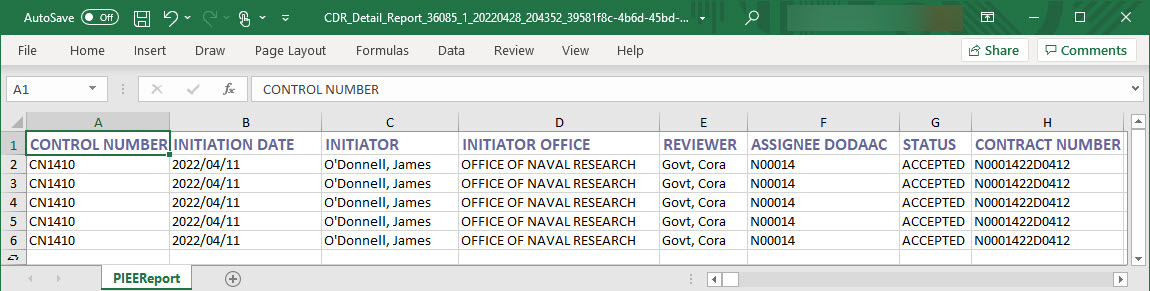
Exported Report Columns:

  • Control Number
  • Initiation Date
  • Initiator
  • Initiator Office
  • Reviewer
  • Assignee DoDAAC
  • Status
  • Contract Number
  • Delivery Order Number
  • ACO Mod
  • PCO Mod
  • Admin DoDAAC
  • Assign To
  • Primary CDR POC Name
  • Primary COR POC Email
  • Alternate CDR POC Name
  • Alternate CDR POC Email
  • Issue DoDAAC
  • Payment DoDAAC
  • CAGE Code
  • DUNS
  • Unique Entity Identifier
  • Company Name
  • Company Address
  • Approval Date
  • Next Action DoDAAC
  • Last Status Update
  • Days Aged
  • Days From Last Update
  • Age From Next Action
  • Impact Code
  • Specific Impact
  • Last Comments

Sample Export:

The image provides a preview of the CDR Detail Report Results Excel.